
About two years ago, while preparing a presentation for a group of developers on Erlang, Elixir, and BEAM in general, I wanted to illustrate my points with a more concrete example than my usual slides here and their sometimes confusing loose transcripts here and there.
After my talks, some people, having heard about functional programming, isolated processes, message passing, immutable data, monitoring, and distribution, generally react with:
“Wow! That sounds interesting. Maybe I’ll check it out.”
Others, on the other hand, react more like:
“That’s the weirdest thing I’ve ever heard, and I regret wasting my time.”
Fair enough.
But another question comes up regularly:
“How do you build an actual stateful system with all that?”
So I decided to create something: a game engine for Connect Four. Which I did, and I presented it to them. I’ve now decided to write a blog post about it and explain the process. “Why Connect Four?” you might ask. Well, that’s because it gives us a problem simple enough to understand, yet complex enough to explore how immutable data, functions, processes, registers, supervisors, ETS, and persistent storage can interact on the BEAM.
Be warned, at the end of this article, there’s still no graphical interface. No one will be able to move a bright red token in the browser, and no AI will claim to have planned the winning move seven turns in advance. There’s only the engine. It simply creates games, accepts two players, validates turns, places tokens, detects wins and ties, stores the game state, manages multiple games simultaneously, and terminates inactive games. That’s it.
No UI, OK?
I heard most of you say yes, so am just going to continue.
Look on the bright side: you can deliberately crash one or two games and observe what happens—as well as what happens to all the other games and their players who weren’t doing anything wrong.
This is by no means the best method, the best language, or the best platform for creating a game, and I’m absolutely certain there are better ways to represent the game board in Elixir. Basically, I’m “Jian Yang-ing” in my own way. My goal isn’t to teach you how to develop game engines, but rather a desperate but hopefully not futile attempt to help you understand some of Erlang’s concepts and ways of thinking.
Also, I often mention Erlang here, but the code is written in Elixir. So, whenever you hear (or rather, read) “Erlang”, know that I’m generally referring to any BEAM language, whether it’s Erlang, Elixir, Gleam, etc.
What is Connect Four?
If you’re unfamiliar with Connect Four and haven’t yet clicked on the two links explaining the rules, I must forgive you and remind you here that it boils down to these simple rules:
- Six rows and seven columns
- Two players take turns
- The pieces land on the first empty cell
- Four pieces in a row win
- A full grid with no winner is a draw
So, is that clear? I started by generating an empty supervised Elixir application using the command mix new connect_four --sup, not with Phoenix. And I’m not here to teach you how to install Elixir.
Building the functional game mechanics
Commit:
Implement purely functional game logic (board management and win conditions)
Before worrying about making the game concurrent, recoverable, distributed, possibly equipped with AI, or even capable of overthrowing a medium-sized government, it would be helpful if it could first recognize four consecutive tokens.
If you check the history of my git commits on the repository, you’ll find elements tracing the progressive construction of this project, without too much anticipation (with one or two exceptions). This choice was deliberate, and it’s primarily what I’ll describe here.
A board is just data, my dear friend
The game uses a board with six rows and seven columns. I chose to represent it as a nested list in ConnectFour.Board.
1
2
3
4
5
6
7
8

[
  [nil, nil, nil, nil, nil, nil, nil],
  [nil, nil, nil, nil, nil, nil, nil],
  [nil, nil, nil, nil, nil, nil, nil],
  [nil, nil, nil, nil, nil, nil, nil],
  [nil, nil, nil, nil, nil, nil, nil],
  [nil, nil, nil, nil, nil, nil, nil]
]
nil simply means that the position is empty; a position can also contain :player1 or :player2. You can choose any symbol to represent the tokens, but I opted for these two atoms.
Creating a new board isn’t exactly glamorous:
1
2
3
4
5
6
7
8

@rows 6
@cols 7

def new do
  nil
  |> List.duplicate(@cols)
  |> List.duplicate(@rows)
end
Dropping a token
A player doesn’t choose a row, but a column, and gravity handles the awkward details.
The first task is therefore to find the first empty cell in the given column:
1
2
3
4
5
6
7
8
9
10

defp get_lowest_empty_cell(board, col) do
  0..(@rows - 1)
  |> Enum.reverse()
  |> Enum.reduce_while({:error, :column_full}, fn row, acc ->
    case Enum.at(Enum.at(board, row), col) do
      nil -> {:halt, Cell.new(row, col)}
      _occupied -> {:cont, acc}
    end
  end)
end
We traverse the column from the bottom, stop at the first empty cell, and return the cell’s struct. If there isn’t one, the column is full and we return {:error, :column_full}.
Once the cell is known, placing a token updates the board:
1
2
3
4
5
6
7
8
9
10

defp place_token({:ok, %Cell{row: row, col: col} = cell}, board, token) do
  updated_board =
    List.update_at(board, row, fn current_row ->
      List.replace_at(current_row, col, token)
    end)

  {:ok, cell, updated_board}
end

defp place_token(error, _board, _token), do: error
List.replace_at/3 does not modify the existing board. It returns a new list containing the replacement cell.
Conceptually, we go from:
1

old board + player move --> function -> new board
The old board remains perfectly valid. The new board represents the board after the move. This is the principle of immutability you’ve heard about. We don’t modify the old board; it remains unchanged. We simply return a new one with the modification applied.
Let the functions flow
1
2
3
4
5
6
7
8

def drop(board, %Cell{col: col}, token) when col in 0..6 do
  board
  |> get_lowest_empty_cell(col)
  |> place_token(board, token)
  |> drop_result(token)
end

def drop(_board, _col, _token), do: {:error, :invalid_column}
The public function Board.drop/3 above coordinates the following steps (from top to bottom, it does what it says):
- Find where the token should land.
- Put it there.
- Work out what that move means.
Each function receives the result of the previous operation and passes a new value forward.
An invalid or full column never requires an exception to be raised. {:error, :invalid_column} and {:error, :column_full} are returned respectively.
If the move is successful, the necessary information is obtained for the caller to continue: {:ok, cell, :no_win, updated_board} or {:ok, cell, :win, updated_board}.
It is interesting to note that Board.drop/3 is a classic function. You provide it with a value, and it calculates another.
Did anybody win?
After placing a token, you simply need to examine four possible directions: horizontal, vertical, bottom left to top right, and top left to bottom right.
The code checks if any of these directions contains at least four consecutive tokens belonging to the player who just played. I won’t go into detail here, but check out Board.drop_result/2 and its helper functions for a better understanding. After all, that’s not my main focus. It’s worth noting that diagonal cases require a slightly more thorough exploration of the board, but ultimately, the four directions boil down to the same question: do we have four consecutive tokens in any direction?
These are simply functions that, I’m sure, can be optimized.
Win, draw or carry on wasting the afternoon
Once the board is updated, we are only interested in three outcomes: win, draw, and no win (yet).
The check is simple:
1
2
3
4
5
6

defp win_check(board, cell, token) do
  case is_there_winner?(board, cell, token) do
    true -> :win
    false -> if is_board_full?(board), do: :draw, else: :no_win
  end
end
Since the tokens always fall from top to bottom, a completely full board must have all the cells in its first row occupied. This is the role of the is_board_full/1 function.
At this point, we have enough information to answer a surprisingly important part of the problem.
Given a board and a move, we can now determine:
- whether the requested column is valid;
- whether that column still has space;
- where the token actually lands;
- what the new board looks like;
- whether the move wins the game;
- whether the game has ended in a draw.
And we can easily test all of this in the IEx interface without breaking a sweat.
For example, a horizontal win can be constructed from a regular value:
1
2
3
4
5
6
7
8
9
10
11
12
13
14
15
16
17
18
19
20
21
22
23
24
25
26
27
28
29
30
31
32
33
34
35
36
37
38
39
40
41

iex(1)> row = [:player1, :player1, nil, :player1, nil, nil, nil]
[:player1, :player1, nil, :player1, nil, nil, nil]
iex(2)> empty_row = [nil, nil, nil, nil, nil, nil, nil]
[nil, nil, nil, nil, nil, nil, nil]
iex(3)> board = List.duplicate(empty_row, 5) ++ [row]
[
  [nil, nil, nil, nil, nil, nil, nil],
  [nil, nil, nil, nil, nil, nil, nil],
  [nil, nil, nil, nil, nil, nil, nil],
  [nil, nil, nil, nil, nil, nil, nil],
  [nil, nil, nil, nil, nil, nil, nil],
  [:player1, :player1, nil, :player1, nil, nil, nil]
]
iex(4)> {:ok, _cell, :win, updated_board} = Board.drop(board, %Cell{row: 5, col: 2}, :player1)
{:ok, %ConnectFour.Cell{row: 5, col: 2}, :win,
 [
   [nil, nil, nil, nil, nil, nil, nil],
   [nil, nil, nil, nil, nil, nil, nil],
   [nil, nil, nil, nil, nil, nil, nil],
   [nil, nil, nil, nil, nil, nil, nil],
   [nil, nil, nil, nil, nil, nil, nil],
   [:player1, :player1, :player1, :player1, nil, nil, nil]
 ]}
iex(6)> board
[
  [nil, nil, nil, nil, nil, nil, nil],
  [nil, nil, nil, nil, nil, nil, nil],
  [nil, nil, nil, nil, nil, nil, nil],
  [nil, nil, nil, nil, nil, nil, nil],
  [nil, nil, nil, nil, nil, nil, nil],
  [:player1, :player1, nil, :player1, nil, nil, nil]
]
iex(7)> updated_board
[
  [nil, nil, nil, nil, nil, nil, nil],
  [nil, nil, nil, nil, nil, nil, nil],
  [nil, nil, nil, nil, nil, nil, nil],
  [nil, nil, nil, nil, nil, nil, nil],
  [nil, nil, nil, nil, nil, nil, nil],
  [:player1, :player1, :player1, :player1, nil, nil, nil]
]
You see how we took a board, passed it to the function Board.drop/3 and returned an updated_board, even though the old board is still there? We didn’t modify it. We simply returned a new board.
But Connect Four has rules too
Knowing how the pieces move isn’t quite enough.
Player 2 shouldn’t make a move until they’ve joined the game. Player 1 shouldn’t take seven consecutive turns while Player 2 is distracted. And once the game is won, both players should probably stop placing pieces, even if they firmly believe they can come back.
In short, we need a finite state machine with state transitions like the one below:
Erlang has a full-blown gen_statem behaviour, but this is another opportunity to demonstrate the power of functional programming and pattern matching. The rules of the game can thus become ordinary data modeled in the Rules struct and enforced by Rules.check/2. You can test the rules in an IEx shell as shown below:
1
2
3
4
5
6
7
8
9
10
11
12
13
14

    iex(1)> ConnectFour.Rules.check(%ConnectFour.Rules{state: :initialized}, :add_player)
    {:ok, %ConnectFour.Rules{state: :player1_turn}}

    iex(2)> ConnectFour.Rules.check(%ConnectFour.Rules{state: :player1_turn}, {:drop_token, :player1})
    {:ok, %ConnectFour.Rules{state: :player2_turn}}

    iex(4)> ConnectFour.Rules.check(%ConnectFour.Rules{state: :player1_turn}, {:win_check, :no_win})
    {:ok, %ConnectFour.Rules{state: :player1_turn}}

    iex(6)> ConnectFour.Rules.check(%ConnectFour.Rules{state: :player1_turn}, {:win_check, :win})
    {:ok, %ConnectFour.Rules{state: :game_over}}

    iex(7)> ConnectFour.Rules.check(%ConnectFour.Rules{}, :invalid_action)
    :error
Again, nothing complicated.
A rule’s state is a value. Rules.check/2 takes this value along with an attempted action and returns either another valid rule state in the form {:ok, rules}, or rejects the action by returning :error.
These modules Cell, Board and Rules know how the Connect Four game works, but they still know absolutely nothing about managing a game like this.
This distinction is our next problem.
One player makes the first move, and we receive a new board.
Great! But …
Who remembers the board and the rules before the second move, huh?
So, Where Does a Running Game Live?
Currently, the game consists of functions that transform values. Given a board and a move, a new board can be generated:
1

{:ok, _cell, :no_win, board} = Board.drop(board, cell, :player1)
However, the current board must still be remembered between moves, and it must be possible to know which board a current game belongs to. The players, the turn order, and possibly other game information must also be remembered.
For a game engine capable of handling multiple games simultaneously, it is necessary to store and track the current state of each game.
This is where ConnectFour.Game comes into play as GenServer. A GenServer process corresponds to a game in progress, possessing its own state, approximately in this form:
1
2
3
4
5
6
7
8
9
10
11
12

%{
    id: "game-1",
    status: :active,
    outcome: :in_progress,
    ended_reason: nil,
    started_at: ~U[2026-09-27 07:52:21Z],
    ended_at: nil,
    board: Board.new(),
    rules: Rules.new(),
    player1: %{name: "Ayiko", color: :red, token: :player1},
    player2: %{name: "Dembo", color: :yellow, token: :player2},
}
The important thing is that we have NOT integrated the game mechanics into the GenServer.
Board still knows how to place tokens and detect wins. Rules still knows whose turn it is. The GenServer process simply stores the last values between calls.
For example, here’s what the Game.handle_call/3 callback function currently looks like to place a token:
1
2
3
4
5
6
7
8
9
10
11
12
13
14
15
16

def handle_call({:drop_token, player, col}, _from, state) do
  with {:ok, rules} <- Rules.check(state.rules, {:drop_token, player}),
       {:ok, cell} <- Cell.new(0, col),
       {:ok, actual_cell, win_status, board} <- Board.drop(state.board, cell, player),
       :ok <- maybe_crash_on_cell(actual_cell, player),
       {:ok, rules} <- Rules.check(rules, {:win_check, win_status}) do
    state
    |> update_board(board)
    |> update_rules(rules)
    |> apply_move_result(win_status, player)
    |> reply_success(win_status)
  else
    :error -> reply_error(state, :error)
    error -> reply_error(state, error)
  end
end
Ignore that suspicious maybe_crash_on_cell/2 line for now. We’ll come back to it later.
The process receives a command, passes the game calculations to the functional code we’ve already written, and stores the returned values as the next state.
This gives us another useful property, almost for free: commands sent to a game process are processed one at a time. Two games can run independently, while the moves within a single game remain ordered. Thanks to the GenServer behaviour.
1
2
3
4
5
6
7
8
9
10
11
12
13
14
15
16
17
18
19
20
21
22
23
24
25
26
27
28
29
30
31

$ iex -S mix
iex(1)> game_id = "game-777"
"game-777"
iex(2)> {:ok, pid} = ConnectFour.Game.start_link(game_id, [name: "Player 1", color: :red])
{:ok, #PID<0.217.0>}
iex(3)> Process.alive?(pid)
true
iex(4)> ConnectFour.Game.add_player(game_id, "Player 2", :yellow)
:ok
iex(5)> ConnectFour.Game.drop_token(game_id, :player1, 3)
:no_win
iex(6)> game1_state = ConnectFour.Game.get_state(game_id)
%{
  id: "game-777",
  status: :active,
  started_at: ~U[2026-09-27 07:37:00Z],
  outcome: :in_progress,
  player1: %{name: "Player 1", color: :red, token: :player1},
  player2: %{name: "Player 2", color: :yellow, token: :player2},
  ended_at: nil,
  ended_reason: nil,
  board: [
    [nil, nil, nil, nil, nil, nil, nil],
    [nil, nil, nil, nil, nil, nil, nil],
    [nil, nil, nil, nil, nil, nil, nil],
    [nil, nil, nil, nil, nil, nil, nil],
    [nil, nil, nil, nil, nil, nil, nil],
    [nil, nil, nil, :player1, nil, nil, nil]
  ],
  rules: %ConnectFour.Rules{state: :player2_turn}
}
This GenServer process does not replace our previous functional modules. It encapsulates them within a state-managing process. This process receives commands, calls Rules.check/2 and Board.drop/3, and stores the returned values as the next state.
What began as a small program, initially consisting of a board and rules, has become a complete game process. This process contains the board, rules, and other information in its state, receives messages, and advances the game loop.
We now have a dedicated space to run a game, and we can simultaneously launch as many GenServer processes (i.e., as many games) as we wish. A move played in one game does not require locking the boards of other games.
Assigning Stable Names to Games
Before adding the game GenServer, I habitually added a
Registry, which disrupted my original build plan (Adding a game process registry).Technically, a process doesn’t need a name. We could launch a game, retrieve its PID (like
#PID<0.217.0>above), and use it to interact with the game. The problem is remembering which game each PID corresponds to. This works for one or two games, but quickly becomes tedious with a large number of games.A registry allows us to assign each game a logical name, like
"game-1", and retrieve the corresponding process when needed. Instead of forcing callers to memorize an opaque execution PID, the application can use explicit identifiers.The PID can change later if the process crashes and restarts. The game name, however, remains unchanged. That small distinction will become rather useful once we start killing things.
Let Someone Manage the Games
At this stage, we could launch the game processes and retrieve them by name.
Our next problem concerns the lifecycle. If the games are created dynamically, we need to designate someone responsible for launching them, stopping them, and handling incidents in case of unexpected crashes.
Manually managing these operations from different parts of the application was starting to sound like the opening scene of a future incident report.
The solution is therefore ConnectFour.GameSupervisor, a DynamicSupervisor.
1
2
3
4
5
6
7

defmodule ConnectFour.GameSupervisor do
  use DynamicSupervisor

  def init(_opts) do
    DynamicSupervisor.init(strategy: :one_for_one)
  end
end
Each running game becomes one of its dynamically supervised children. The current GameSupervisor.spawn_game/2 has grown a little because start_game/2 also now knows how to restore stored state, but the child spec still boils down to:
1
2
3
4
5
6
7

child_spec = %{
  id: ConnectFour.Game,
  start: {__MODULE__, :start_game, [id, opts]},
  restart: :transient
}

{:ok, _pid} = DynamicSupervisor.start_child(__MODULE__, child_spec)
The :transient restart setting is useful here, as not every stopped game needs to be restarted. If a game finishes its task, remains idle for a while, or is stopped intentionally, it should remain in a “dead” state. Conversely, if it stops due to an unexpected failure, it must be restarted.
This also allows for effective fault isolation: the crash of one game does not necessarily cause the others to stop.
I have already discussed supervisors, links, and Erlang’s approach to failure in greater detail in the article Somewhere Right Now, a System is Failing; I will therefore spare you another sermon on supervision.
However, there is an important nuance.
What do you think happens to a game’s state when it stops?
Restarting a process is easy.
Restarting it while preserving the state it held before the crash is a completely different story.
Restarting the Process Is Not Enough
Commit:
Added a self-healing ETS cache
Our supervisor is now able to restart a game process that has crashed. Unfortunately, the new process has no knowledge of what the old one was doing.
A process restarted with a blank board is technically active, but from the players’ perspective, we have just lost all the game’s progress data (which was stored in its state).
We therefore need a location outside the game process to store its most recent state.
To achieve this, at this stage of development, we can use an ETS-based ConnectFour.Cache.
Thus, after every valid move, the game process would update the cache:
1
2
3
4

defp reply_success(state, reply) do
  :ok = Cache.put(state.id, state)
  {:reply, reply, state, @timeout}
end
When a game process is restarted, it can look for an existing state instead of blindly creating an entirely new one:
1
2
3
4

case Cache.get(game_id) do
  {:ok, state} -> state
  {:error, :not_found} -> fresh_state(game_id, player_name)
end
This is where the recovery scenario proves a bit more useful: the game process crashes, the supervisor launches another one, the new process retrieves the previous state from the ETS cache, and the game continues.
ETS tables themselves must be attached to an owning process; if that process dies—poof!—the table evaporates. This immediately raises the kind of question this project seemed determined to ask relentlessly:
What happens if the process managing the cache crashes too?
To avoid losing the table with its owner, the cache gives the ETS table a heir. A small ConnectFour.CacheRestore process temporarily receives ownership when the cache dies and hands the table back when a replacement ConnectFour.Cache process starts.
All this still uses the same mechanisms of links and monitors described in my previous blog. Better go read up if you still haven’t.
Go on. We won’t leave you behind.
Also ETS is just an in-memory store that comes bundled with the Erlang runtime. We tend to use it in situations where other ecosystems would reach for something like Redis. This doesn’t mean it’s a Redis replacement though.
So, we have made the game capable of recovering after a game process crash, and the cache capable of doing the same after a cache process crash.
For now, as long as the BEAM virtual machine remains active and never shuts down—regardless of the circumstances—everything should be fine. But hold on; let’s not get ahead of ourselves.
What happens if the virtual machine stops? Have you thought about that? If the application shuts down completely, the ETS disappears along with it.
That brings us to the next problem: persistence.
Surviving an Application Restart
Commit:
Persist game history with DETS
ETS solved one kind of failure: a game process could die and come back without forgetting everything. But ETS is still memory.
Stop or restart the whole application and that state is gone. So the next step is to persist game state somewhere durable. For this project I used DETS, the somehow remembering brother of ETS, behind ConnectFour.Store. That D there stands for disk, meaning it saves to disk instead of keeping everything in memory like ETS.
ETS makes it possible to resolve one type of failure: a game process could stop and then restart without losing all its data. However, ETS still relies on RAM.
If the entire application is stopped or restarted, this state is lost. The next step, therefore, is to persist the game state to durable storage. For this project, I chose to use DETS—the “sibling” of ETS capable of data persistence—via ConnectFour.Store. The “D” in its name stands for “Disk,” indicating that it saves data to disk rather than keeping everything in memory like ETS does.
After successful state changes, the game state is written to the store:
1

:ok = Store.put(state.id, state)
The game state—and thus the data store—retains enough information to distinguish ongoing games from those that have finished, expired, or been stopped.
Then, upon application startup, ConnectFour.Init queries the store to retrieve the ongoing games:
1
2
3
4

Store.active()
|> Enum.each(fn %{id: id} = game_state ->
  GameSupervisor.spawn_game(id, state: game_state)
end)
So application startup becomes roughly:
1
2
3
4
5
6
7
8
9
10
11
12
13

application starts
      |
      v
open DETS store
      |
      v
start GameSupervisor
      |
      v
Init reads active games
      |
      v
start a process for each one
Completed games stay in storage as history, only active games are brought back to life.
Once the DETS system is added, the applicable recovery procedures differs somewhat from those of the previous version, which relied solely on the ETS:
1
2
3
4
5
6
7
8

game process crashes
    -> GameSupervisor reloads the last active state from DETS

cache process crashes
    -> CacheRestore temporarily keeps the ETS table alive

whole application restarts
    -> Init reads active games from DETS and starts them again
So in the current code, GameSupervisor.start_game/2 uses the durable store for game-process recovery, while ETS remains the fast runtime cache.
DETS is perfectly adequate for this little engine and for demonstrating the idea. It is not meant to suggest that DETS is what I would automatically reach for when building a production, multi-node game service.
At this stage, we finally have the necessary infrastructure to carry out the irresponsible act I had wanted to attempt from the start.
Deliberately crashing a running game and observing what survives.
What Have We Built?
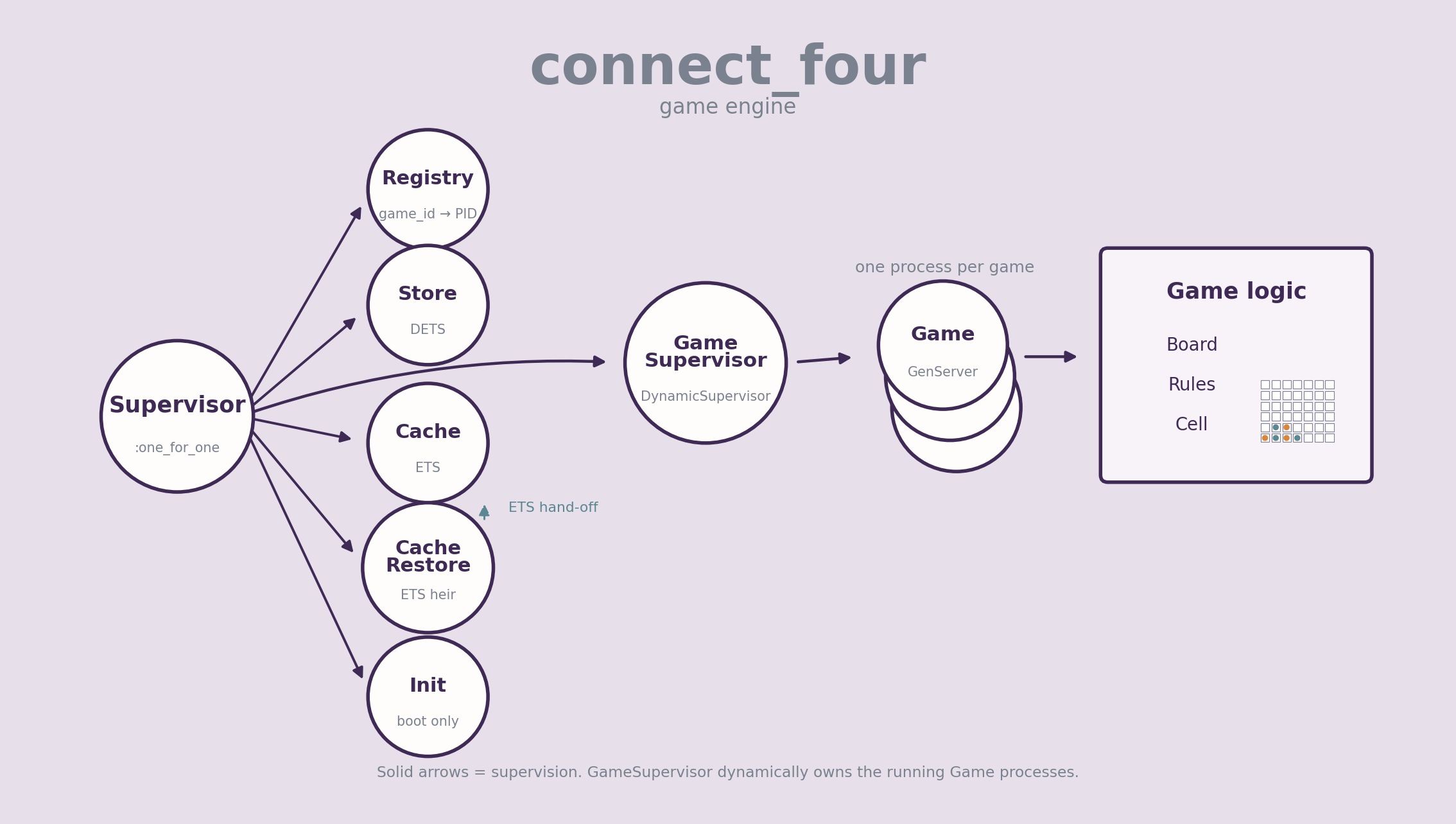 Connect Four game engine process architecture
Connect Four supervision tree and application startup sequence
OTP starts the top-level children in the order declared in ConnectFour.Application: CacheRestore -> Store -> Cache -> Registry -> GameSupervisor -> Init. Init runs last, reads active games from the store, asks GameSupervisor to recreate them and then returns :ignore, so it is not part of the steady-state tree. Solid arrows above are supervision; the dotted then arrows only show startup order.
Now Let’s Break It
At this point we have built the game from ordinary functional logic into something with supervised processes, runtime state and durable recovery. Naturally, the next sensible thing to do is break it.
I planted a deliberately bad condition inside ConnectFour.Game:
1
2
3
4
5

defp maybe_crash_on_cell(%Cell{row: 4, col: 6}, :player2) do
  raise "Deliberate crash when :player2 drops a token on cell row=4 col=6"
end

defp maybe_crash_on_cell(_cell, _player), do: :ok
Player 1 first drops a token into column 6, filling the bottom cell. When Player 2 drops into the same column, its token lands directly above it and triggers the crash.
1
2
3
4
5
6
7

          c0  c1  c2  c3  c4  c5  c6
row 0    [ ] [ ] [ ] [ ] [ ] [ ] [ ]
row 1    [ ] [ ] [ ] [ ] [ ] [ ] [ ]
row 2    [ ] [ ] [ ] [ ] [ ] [ ] [ ]
row 3    [ ] [ ] [ ] [ ] [ ] [ ] [ ]
row 4    [ ] [ ] [ ] [ ] [ ] [ ] [X]  <- boom
row 5    [ ] [ ] [ ] [ ] [ ] [ ] [O]
The interesting part is not the exception itself.
The game process dies, the supervisor starts another one, and the game can still be found using the same logical game ID with the last clean state it had before the crash.
The PID changes:
1
2
3
4
5
6
7
8

pid_before = #PID<0.241.0>

... game crashes ...

pid_after  = #PID<0.247.0>

pid_before != pid_after
true
But the game returns from its last successfully stored state.
Nothing magical rolled the failed process backwards. That process is gone. A new one was started and reconstructed from state that existed outside it.
That is the useful part of “let it crash” for this example: not that crashes are desirable, but that one unexpected failure can be isolated and recovered from without taking the rest of the application with it.
I’ll leave the remaining destructive entertainment in the repository README. There are examples for killing a game process directly, killing some of the supporting processes and trying a rather more interesting experiment involving the GameSupervisor itself.
Feel free to break those on your own machine. Just install Elixir and follow the Running Locally section. I have already done enough damage here.
That’s Enough Damage for One Day
We started with a board represented by standard Elixir data and a few functions capable of placing tokens and detecting a winner.
Then—and only when the need arose—we added a process to maintain the state of an ongoing game, a registry to look up games by name, a dynamic supervisor to manage their lifecycle, as well as ETS for fast in-memory state access and DETS for data persistence and recovery.
None of these pieces were particularly useful at the start. They became so because the previous version of the engine eventually raised a question it couldn’t answer on its own.
That, more than anything, is the whole point of this little vacation into the BEAM.
The complete code is on GitHub, and the README contains a few more failure drills and some lousy stress tests if you would like to continue killing things after I have stopped.
At some point I may commit another act of unnecessary engineering and put a Phoenix interface on top of this thing.
Until then, the engine works.
Mostly.
Just stay the heck away from row 4, column 6.
Inspiration and References
- The Pragmatic Studio’s Buzzword Bingo game intro.
- Functional Web Development with Elixir, OTP, and Phoenix
- Elixir Patterns
- Elixir Docs